Zoom Frame Mode
A unified presentation interface that keeps chat, audience video, and presenter notes persistently accessible during screen sharing, transforming isolated presentations into collaborative experiences.
Overview
Zoom Frame Mode is a redesigned presentation interface that addresses a core friction point in remote collaboration: when a user shares their screen, they lose visibility into their audience, their chat, and their own notes. This project reimagines the screen-sharing experience as a unified, always-visible interface — keeping presenters connected to their audience without sacrificing focus.
This was a collaborative team project completed at UC Berkeley’s School of Information.
Problem
Through user research, our team identified a recurring frustration across remote collaboration contexts: screen sharing is an isolating experience. Zoom’s current model restricts sharing to one person at a time, and when that person shares, they lose access to participant reactions, chat activity, and presenter notes — creating unnecessary friction and reducing the quality of collaborative presentations.
Research
Our team distributed research responsibilities to ensure broad coverage. I conducted two in-depth user interviews, gathering firsthand accounts of participants’ experiences with Zoom’s screen-sharing workflow. Across interviews, a clear pattern emerged:
- Users found the one-at-a-time sharing model limiting, particularly in collaborative or co-presenting scenarios
- Switching between shared screen and participant view was described as disruptive and cognitively taxing
- Several participants had missed critical chat messages or audience cues mid-presentation
We synthesized our findings across the team to identify the core insight driving our design: the lack of simultaneous visibility is the root of the friction, not the sharing itself.
Early Sketches
Before moving into digital lo-fi wireframes, we worked through initial concepts by hand — rough sketches to quickly explore layout ideas and think through the information architecture before committing to anything more structured.
Lo-Fi Prototype
With our research synthesis complete, we moved into low-fidelity prototyping to rapidly explore layout concepts and information hierarchy. We explored two primary directions:
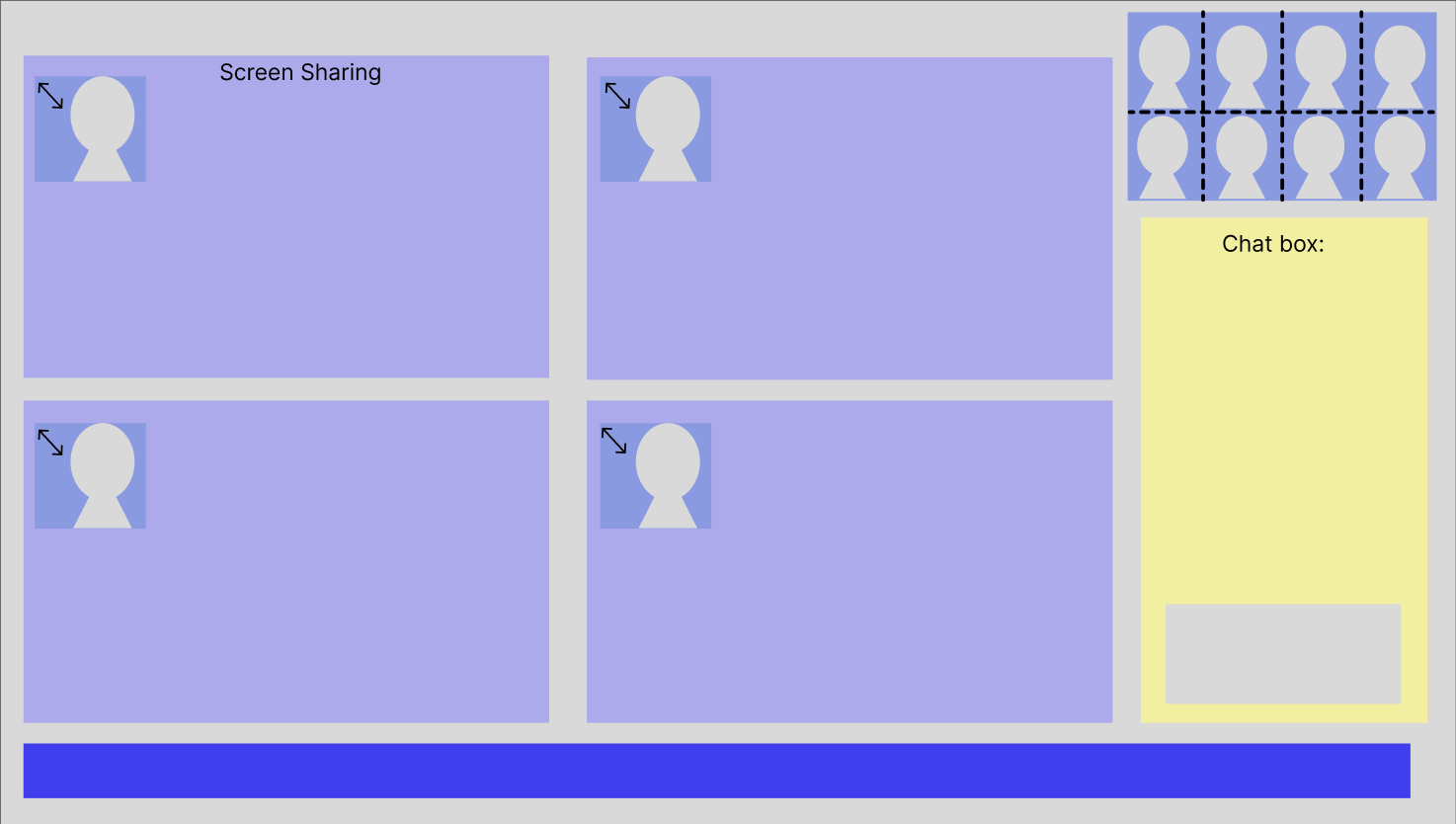
- Prototype 1 — A multi-pane grid layout allowing multiple participants to share screens simultaneously, with chat integrated as a persistent sidebar
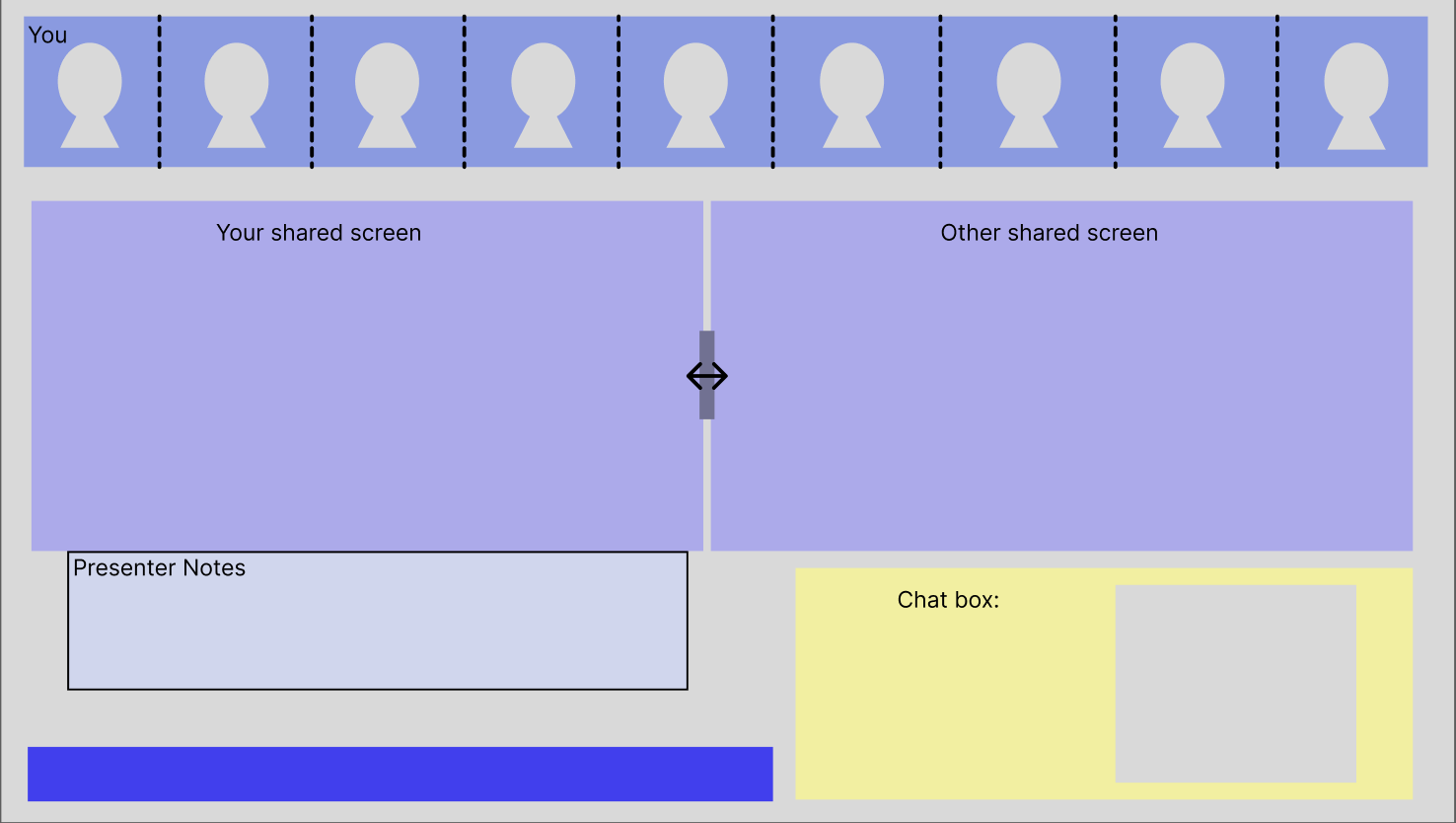
- Prototype 2 — A split-view layout giving the presenter visibility into both their own shared screen and another participant’s, alongside a persistent presenter notes panel and chat
We conducted usability testing on the lo-fi prototypes and surfaced several areas where the interactions felt unintuitive — particularly around switching focus between panes and understanding whose screen was visible at a given moment.
Hi-Fi Prototype
Informed by usability feedback, we iterated toward a high-fidelity prototype that prioritized clarity and familiarity. The refined design introduces a Frame Mode — a persistent overlay that keeps participant video, chat, and presenter notes visible at all times, even while sharing.
Iteration 1 — Single Focus with Persistent Frame
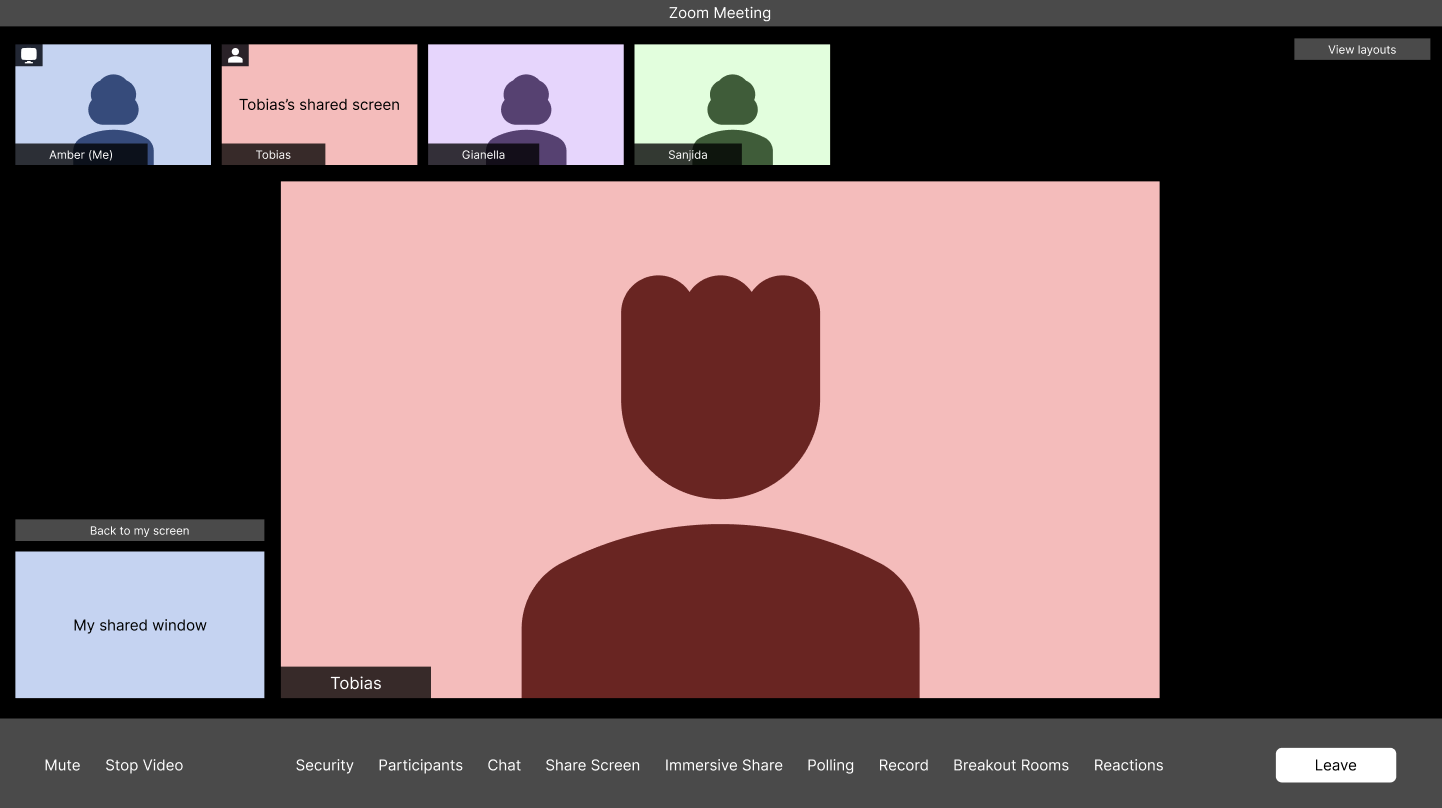
The first hi-fi iteration established the core pattern: audience video tiles are anchored at the top, while the shared screen occupies the main canvas. The presenter retains their own screen view in a compact sidebar alongside a “Back to my screen” affordance — eliminating the need to stop sharing to regain context.
Final Design — Double Focus Layout
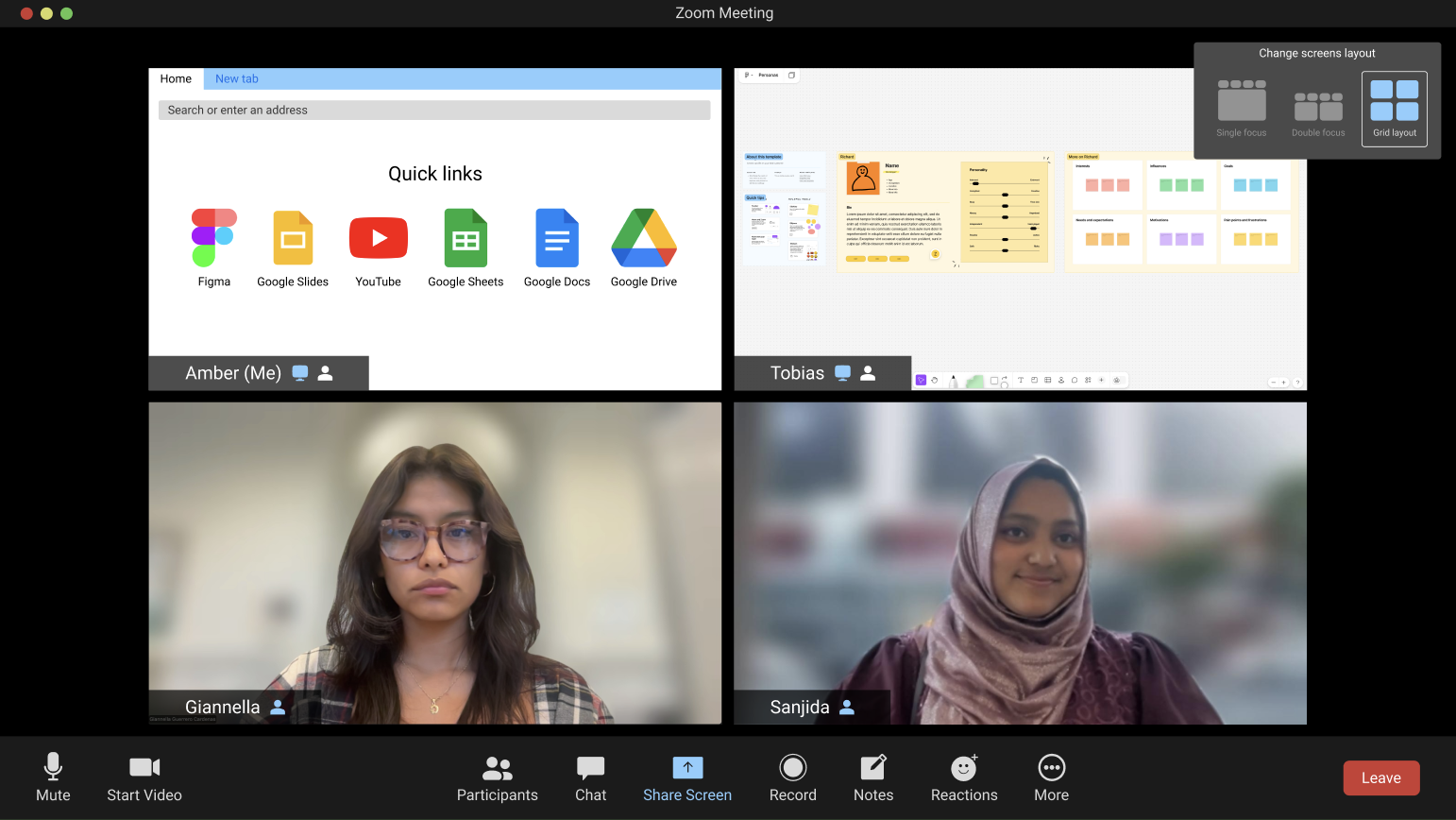
The final iteration introduced a Double Focus layout mode, allowing two screens to be shared simultaneously side by side. Participants can switch between Single Focus, Double Focus, and Grid layouts via a persistent layout selector — giving teams flexibility based on their collaboration style.
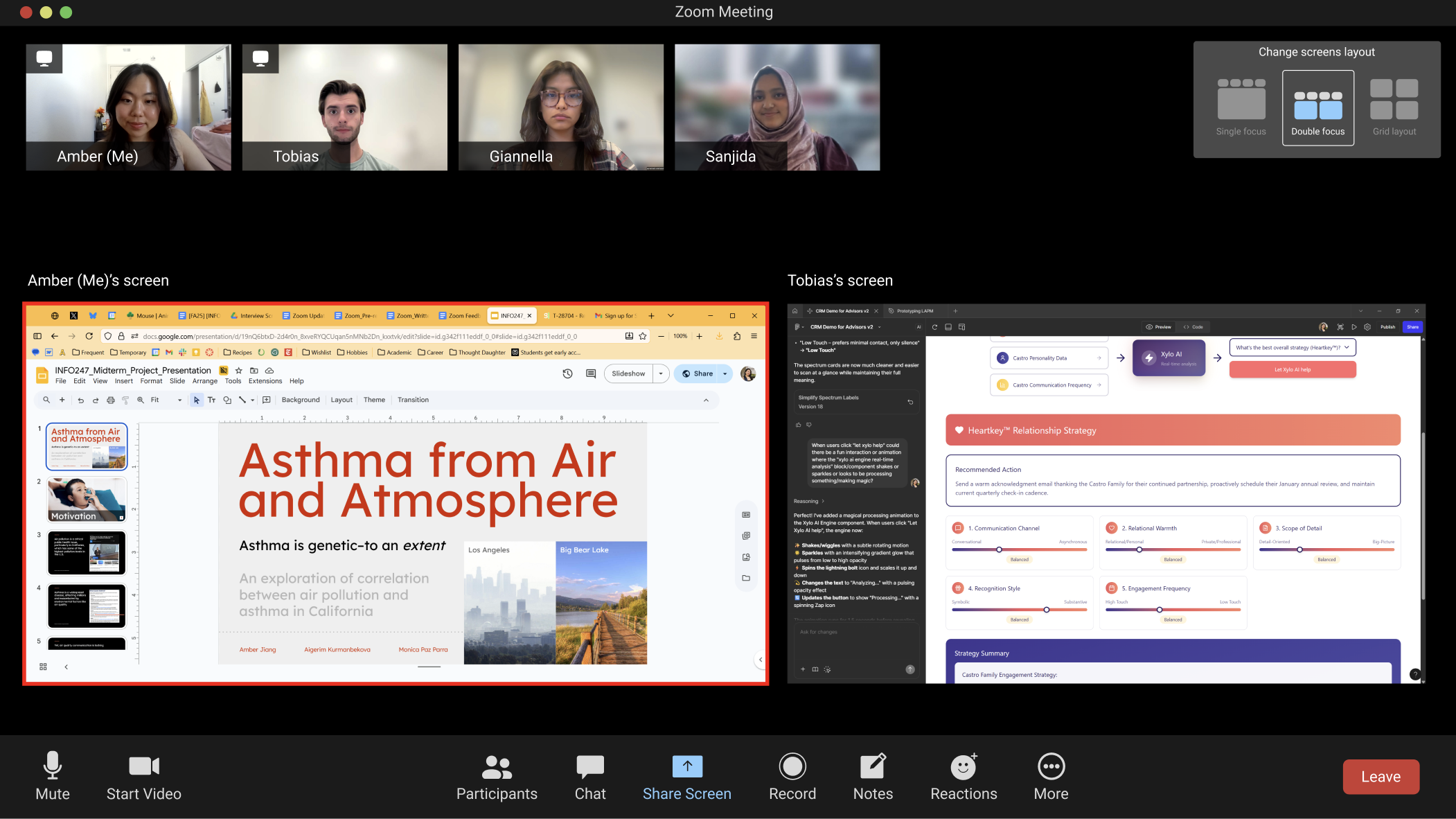
Usability testing on the hi-fi confirmed that the design felt immediately familiar to existing Zoom users while meaningfully expanding what was possible. Participants described the experience as “straightforward” and noted that the persistent layout controls reduced the cognitive overhead of managing shared content during a live session.
Outcome
The final prototype and supporting research were presented to stakeholders with a full report documenting our methodology, findings, and design rationale. The project demonstrated how incremental, user-informed iteration — from interview synthesis to lo-fi exploration to tested hi-fi design — can resolve a systemic usability gap in a widely used platform.